|
|
| Ligne 1 : |
Ligne 1 : |
| | {{ENG-CANSAT-NAV}} | | {{ENG-CANSAT-NAV}} |
| | | | |
| − | == RFM69 Radio Module ==
| + | {{COMMON-CANSAT-ANTENNA}} |
| − | Before starting make sure you have your Feather and Arduino working properly with basic functionalities. This will make this part more easier and you can upgrade your project to radio transmission.
| |
| − | | |
| − | [[Fichier:ENG-CANSAT-RFM69HCW.png|360px]]
| |
| − | | |
| − | Both RFM69 and RFM9x LoRa breakouts have the exact same pinouts! And they exists in 900 MHz or 433 MHz flavor.
| |
| − | * The silkscreen identify the RFM69HCW -OR- LoRa
| |
| − | * The 900 MHz modules have a green or blue dot on top.
| |
| − | * The 433 Mhz modules have '''a red dot''' on top.
| |
| − | | |
| − | The sub-GHz radio transmission does have lower throughput so it is not made to stream audio or video! The sub-GHz is suited for small packets of data. The data rate is adjustable but its common to stick to around 19.2 Kbit per second. Lower is the rate and better woud be the transmissions.
| |
| − | | |
| − | To use such modules you will need both of them! The radios must be matched in frequency (eg: 433 MHz & 433 MHz will match, 433 MHz & 900 MHz will not match).
| |
| − | | |
| − | The both module must use the same encoding schemes. You cannot use a RFM69 900 MHz packet radio together with a RFM9x packet radio (LoRa).
| |
| − | | |
| − | {{ambox|text=In Belgium, you cannot use the RFM69 900 Mhz without having the appropriate license, see this [https://www.bipt.be/en/operators/radio/frequency-management/frequency-plan "IBTP Frequency Plan" link for more details].}} | |
| − | | |
| − | According to the same "[https://www.bipt.be/en/operators/radio/frequency-management/frequency-plan IBTP Frequency Plan]" the RFM69HCW should be used between 430-440 MHz.
| |
| − | | |
| − | == Raw vs Packet Transmission ==
| |
| − | [[Fichier: ENG-CANSAT-RFM69HCW-SX1231.png]]
| |
| − | | |
| − | The SX1231 module used on the RFM69 breakout board can be used in 'raw Rx/Tx' where it modulates incoming bits (from pin #2) and sends them on the radio. In 'raw Rx/Tx' there is no error correction and no addressing. This mode is weak and error prone so it will not be covered.
| |
| − | | |
| − | Packet mode will be suited for almost 99% of use cases. When packetized, the code can setup a recipient for the data, ensure error correction (''data transmitted correctly''), automatic retries on transmission error and acknowledgement when the packet is delivered. In packet mode, you got a reliable data pipe, transparent communication without getting care about the complex details of data transmission over radio frequencies.
| |
| − | | |
| − | With a SX1231 module, the complexity is reduced to 4 main characteristics more easy to handle:
| |
| − | * the frequency to use
| |
| − | * the power level to use
| |
| − | * the encryption key to use
| |
| − | * the appropriate antenna (depending on the expected transmission range)
| |
| − | | |
| − | == Power Pins ==
| |
| − | [[Fichier:ENG-CANSAT-RFM69HCW-Power.png|240px]]
| |
| − | | |
| − | * '''GND''': Common ground between logic and power.
| |
| − | * '''Vin''': Power In 3.3 to 6V. The board regulated it to 3.3V. '''Be sure you can supply up to 150mA''' on this pin since Radio Emitting can reach this current level.
| |
| − | * '''EN''': Enbable Pin used to switch off the Power supply (and the radio module). EN pin use a pull-up resistor to maintain the regulator enabled, just set it to LOW to switch off the radio.
| |
| − | | |
| − | == SPI Interface Pins ==
| |
| − | Those pins are use to communicate with the host micro controller. The standard SPI bus pins are MISO, MOSI, CLK and ChipSelect.
| |
| − | | |
| − | This radio breakout also expose the radio RESET pin and radio INTERRUPT pin (named G0) to offer a better control over the Radio communication.
| |
| − | | |
| − | [[Fichier:ENG-CANSAT-RFM69HCW-SPI.png|240px]]
| |
| − | | |
| − | {{ambox|text=All the pins (except extra GPIOs) are wired thought a level shifter. This means that logical level (3.3 or 5V) will be compatible with the voltage applied on Vin!}}
| |
| − | | |
| − | * '''MISO''': Master In Slave Out. This pin is used to send data from the radio (the slave) to the micro controller (the master).
| |
| − | * '''MOSI''': Master Out Slave In. This pin is used by the micro controller to send data to the radio.
| |
| − | * '''SCK''': Clock signal used to synchronise bits exchanges between the Master and the Slave.
| |
| − | * '''CS''': This is the '''C'''hip '''S'''elect. Place it to LOW level to initiate transaction with the radio module. The CS pin make sense when several slaves (eg: radio module + LCD display) are present on the SPI bus.
| |
| − | * '''RST''': The '''reset''' pin of the radio module. Set it to LOW to reset the radio module.
| |
| − | * '''G0''': This is the GPIO 0 pin of the radio module. This pin has a special interruption function attached to it because it act as '''IRQ''' (Interrupt Request) pin. The radio module manipulate it to send to notification toward the micro controller. This pin is in 3.3V logic.
| |
| − | | |
| − | == Antenna spot ==
| |
| − | [[Fichier:ENG-CANSAT-RFM69HCW-Antenna.png|240px]]
| |
| − | | |
| − | There are 3 ways to connect an antenna on this spot.
| |
| − | | |
| − | The cheapest is the wire antenna (a simple dipole) and the best option is the SMA connector.
| |
| − | | |
| − | {{ambox-stop|text=An antenna is ABSOLUTELY REQUIRED to allow any data transmission. No communication possible (even 1 meter) without antenna.}}
| |
| − | | |
| − | For testing purpose, we suggest to twist a wire inside the antenna hole (take care to not touch the ground spots with the wire).
| |
| − | | |
| − | Later on, you would focus on antenna choice:
| |
| − | * A wire inside the antenna hole (said a ''wire dipole'').
| |
| − | * A {{pl|1418|µFl connector}} to plug antenna.
| |
| − | * A {{pl|1419|PCB SMA connector}} also to plug other kind of antenna.
| |
| − | | |
| − | A µFl connector (also named uFl) is looking to this:
| |
| − | | |
| − | [[Fichier:ENG-CANSAT-RFM69HCW-TEST-uFL-connector.jpg|150px]]
| |
| − | | |
| − | A PCB SMA Connector is looking to this:
| |
| − | | |
| − | [[Fichier:ENG-CANSAT-RFM69HCW-TEST-SMA-connector.jpg|150px]]
| |
| − | | |
| − | [[ENG-CANSAT-ANTENNA|The CanSat tutorials also have a section dedicated to the Antenna and alternative communication devices]]
| |
| − | | |
| − | == Extra GPIOs Pins ==
| |
| − | [[Fichier:ENG-CANSAT-RFM69HCW-GPIOs.png|240px]]
| |
| − | | |
| − | The radio module also feature 5 additionnal GPIOs (from G1 to G5) to raise interrupt request depending specific conditions.
| |
| − | | |
| − | As they are usually free for use (not used for notification or radio functions) you can control them for the purpose of your project.
| |
| − | | |
| − | Those pins are '''3.3V logic without level shifting'''.
| |
| | | | |
| | {{ENG-CANSAT-TRAILER}} | | {{ENG-CANSAT-TRAILER}} |
Introduction
The RFM69HCW Testing shows how to transmit data back and forward between 2 radio modules.
This looks simple with the homemade quarter wave antenna, but better antenna design is required for long distance communication.
 |
What ever you do, the antenna is always the most sensitive component when working with radio communication.
Wrong antennas design may ruin the communication below 10 meter.
Great antenna design with attention to details will allow the RFM69 module to transmit data quite over 4 Km (I tested it in second article and this former article).
The antenna is the key to transmit data over a long distance! |
Before blaming a radio module think twice to the following:
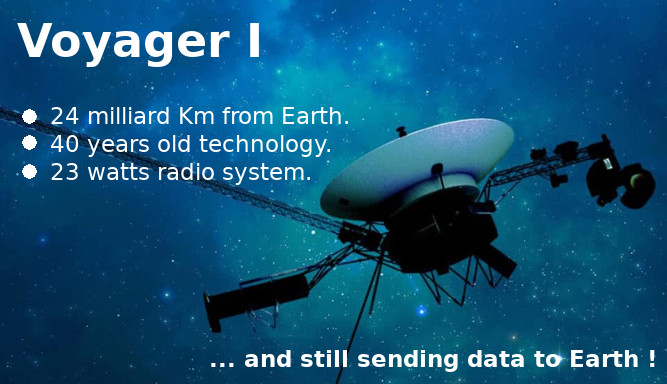
- 23 watts covers 24 milliard of Km.
- 1 watt covers 1.04 milliard of Km.
- 0.1 watt covers 100 million of Km.
A RFM69 radio module at 20 dBm have an emitting power of 0.1 watt (100 mW).
Compared to Voyager I, the 100 mW of the RFM69 should be quite enough to transmit the data over kilometers.
Remark:
using a rule of three between the Voyager I distance and radio power is a bit over-simplistic but is good enough to demonstrate the possibility of sending data on long distance with RFM69 @ 433 MHz.
The "Antenna for Cansat" booklet
The following booklet is available under licence Creative Common BY-SA-NC-ND .
- BY-NC-ND : Author attribution required. Share-alike only, without modification, without commercial use.
- SA : Share alike licence (licence cannot be modified)
Please refer this booklet with a link to this page.
7 Rules for Radio Antennas

- Rule #1: Use short, high quality and thick antenna cables.
- Rule #2: An SWR below 2 is acceptable (less than 11% of power is reflected so we have much of the power available for transmission).
- Rule #3: Always connect an antenna to the sender (otherwise 100% of signal is reflected, which may kill the sender)
- Rule #4: Keep the polarization of your antennas the same way.
- Rule #5: The more dBi, the more power in one direction.
- Rule #6: With a proper antenna setup, the distance in air is not an issue if we have a line of sight.
- Rule #7: Longer is not always better for antennas. Smarter is better.
All coming from the famous video of Andreas Spiess.
Getting Help from Radio Amateur
Designing and testing an antenna for long distance communication is an intensive work.
You could find some help from our Radio Amateurs friends.
To locate a Radio Amateur Club near of your home then have a look the "Maker's Maps" owned at MC Hobby.
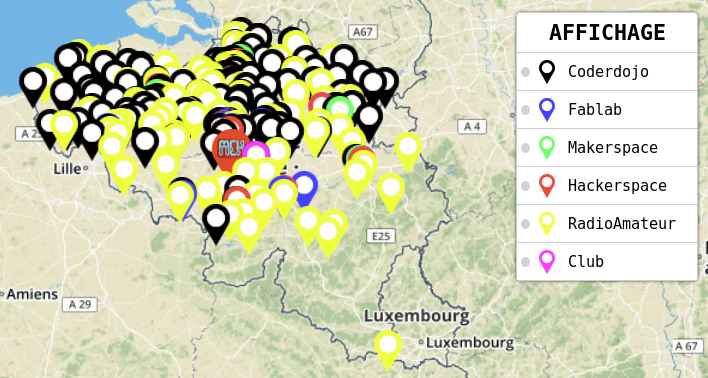
A yellow mark indicates the Radio Amateur clubs.
Written by Meurisse D. from MC Hobby - License: CC-SA-BY.